About BOCLAA
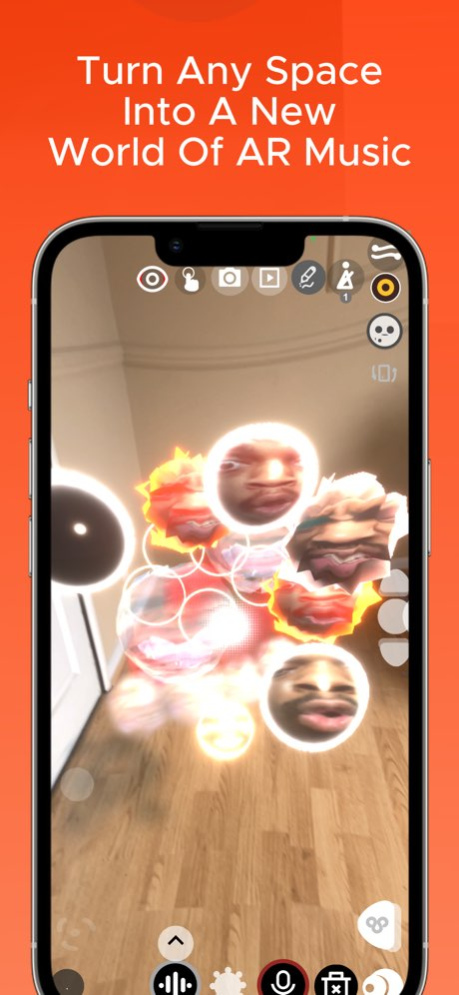
BOCLAA is a revolutionary Creative Augmented Reality App for creating Live Loop Songs, Melodies and atmospheric worlds of music. It is a new artistic expression for the explorative . BOCLAA Version 2.5.5 is an exciting...
BOCLAA is a revolutionary Creative Augmented Reality App for creating Live Loop Songs, Melodies and atmospheric worlds of music. It is a new artistic expression for the explorative . BOCLAA Version 2.5.5 is an exciting new Augmented Reality Music Production and Visual App developed by Zachary Aghaizu. There are a multitude of features for an immersive and creative experience spawning and interacting with your own recordings and other recordings. This includes World AR, Image Tracking and User FaceTracking making full use of Augmented Reality possibilities. *BOCLAA Introduces the new IMMERSE, which allows anyone to download .boclaa files provided on my website and unlimited subscribers can share their own .boclaa scenes for any of their friends and supporters to experience. You may purchase an auto-renewing subscription through an In-App Purchase. . Auto-renewable subscription . 1 month ($4.99) . Your subscription will be charged to your iTunes account at confirmation of purchase and will automatically renew unless auto-renew is turned off at least 24 hours before the end of the current period. . Current subscription may not be cancelled during the active subscription period; however, you can manage your subscription and/or turn off auto-renewal by visiting your iTunes Account Settings after purchase . Privacy policy: https://www.zacharyaghaizu.com/privacy-policy . Terms of Use: https://www.apple.com/legal/internet-services/itunes/dev/stdeula/
Version History - UI Improvements - Melody Mode Improvements and addition of Remake For “BOO” - Synth Mode Fixes - New Default Sounds Added - Apply Pitch Bend to all of the same sample 2.5.5 06/12/2025 -Glitch to Metronome tempo with Quantize On -Ui Fixes/Improvements -Line Drawing Midi & Synth Improvement -More New Synthesizers -Finger Mode + Hold Mode Synth muting Fix -Synth Volume COntrol mixer more control 2.5.3 01/06/2025 -UI fixes: Synth UI + Pitch Slider (midi/synth mode) -New Synthesisers : Keys, Pads, Bass, Lead -Fixed Ability To Replace Selected Sounds and switch between Synths, Midi and Samples -Mute/Unmute Synth/Midi -Copy and Paste Drawing Lines without losing ripple 2.5.2 01/05/2025 - Synthesizer Update For More Stability - Fix for parameter patch reset when changing synth type - Water Material Update - Line Material changes with Color Picker - New Pluck Synth Added - New Pitch Bend Wheel feature - Ghost Controlled fx + Sensitivity fixed - Voice Limit Increased - More Sounds can play at the same time (Lines won’t cutoff) - Midi/Synth Spawn Undo 2.5.1 12/09/2024 -New Materials For Drawings -New Individual FX - Bit Crusher/ 8Bit, BASS BOOST IGNORE Main FX -Improved Image Drawing UI For Setting up Animation Custom Faces (Onion Skin) -Removed Clip/Click Sounds At The End Of Recordings - Capability of Hitting Lines/Drawings Instead Of Stubbing - Allowing Drum Lines - Shape Changer For BOX Shapes Brought Back -UI Fixes - Echo FX Adjustability -Fixed Bugs On Some Functions -Mute/Unmute Line Fixed -Restart Fix For Subscribers 2.4.9 10/22/2024 -New Materials For Drawings -New Individual FX - Bit Crusher/ 8Bit, BASS BOOST IGNORE Main FX -Improved Image Drawing UI For Setting up Animation Custom Faces (Onion Skin) -Removed Clip/Click Sounds At The End Of Recordings - Capability of Hitting Lines/Drawings Instead Of Stubbing - Allowing Drum Lines - Shape Changer For BOX Shapes Brought Back -UI Fixes - Echo FX Adjustability -Fixed Bugs On Some Functions -Mute/Unmute Line Fixed 2.4.6 10/18/2024 - Opening UI Fix - Creator UI fix - Removed Unused features - Pitch Slider Ui fix - Faces resetting to current face when duplicated - iOS 17 compatibility 2.4.5 05/25/2024 - Double Tap Stopping Looper mutes Midi Sounds - Save Load Toggles unsaved - Finger Mode with Hold Sound Mode causes cut out of sounds when tapping - Cloud & Water materials now take custom Images - Drawing Lines - removed Taptics for smoother experience - Restart App Button for Tutorial - for users to escape to melody 2.4.3 04/15/2024 - Hidden Eraser returned - Access to view BOCLAA Creator Mode Tutorial for free users - Melody Mode Lower Threshold for Good Voice Recording - Hold Mode Flashing Balls at end fix - Measuring Lights for spacing assistance returned - Line drawing Starts Muting App Fix - Face/Images UI improvement 2.4.2 04/09/2024 -Toggle for the Synthesizer and Midi fixed -Cancel Option when saving menu opens - Ui fixes - Boost and reduce volume for imported audio without audio editor - Loading file with Separate Saved Materials fix 2.4.1 04/02/2024 — UPDATE SUMMARY —Finger Toggle fix -Unity version back to 2021 - -Update Summary —— -New Intuitive Sample Trimming in Audio Editor -New Glitch mode -Improved Audio Editor UI -Face UI Fix -Face Mode Toggle Expression Controls Off -Subscriber Promo Page Exit fix -Melody Placement of pitch Fix 2.4.0 03/21/2024 -New Intuitive Sample Trimming in Audio Editor -New Glitch mode -Improved Audio Editor UI -Face UI Fix -Face Mode Toggle Expression Controls Off -Subscriber Promo Page Exit fix -Melody Placement of pitch Fix -Upgraded AR 2.3.9 03/20/2024 - Toggle imgMode Line - off At Start - Hold Face Images Fix - Undo Spawn fixed back - Import Melody with Reverse - New - Change Emission/Flash Color - Face Edit Ui Fix - Stutter Play Looper Improvement -Trim Clip Spawn Fix 2.3.6 03/05/2024 - Face Editing UI fix - Face Editing Preview - Loading Face from save Keeps face - Replace Face Of Selected -Copy Paste Lines Fix -Copy Paste Faces Fix -FX reset with chorus flanger -Change all Line Colors if Line Drawing Mode is Toggled 2.3.5 02/28/2024 - Looper Changing the Measure down while recording causes it to skip to 1 - New Recording Objects : Face Mode fix - Melody Pitch slider Setup skipping for new files fixed - Saving and Loading turns colors blue and new spawns become black material fixed - Dragging objects with new materials removes materials fix - Change Individual Material Mode setup to change the main material - If user Chooses wrong audio file— it will now cancel instead of making a new file - Missing default audios in Loading fix 2.3.3 02/27/2024 - Melody Video Recording and Sharing Fix - Melody Whale example fix - Ui fixes - Melody Walk Through clearer 2.3.2 02/19/2024 - Introducing MELODY which allows anyone to learn to build a loop song in BOCLAA and subscribers can share BOCLAA sounds with anyone to remake - Including multiple loop song examples made on BOCLAA - Improved Dynamic PitchSlider - Improved Saving and Loading - Improved Microphone - Many new Interactive visual Materials for your sound balls or lines including glow and displacement - Unfaded Lines for single hit line sounds - When Opening the App Defaults to Hard Mode, showing the full UI and capabilities - Improvements to the UI & clearer display - New Sounds and Synthesiser - Ability to Import Helm Synthesiser from the DAW - New Facial Reaction Patterns, including Audio Reactive Faces - Facial Expression Control (iOS) in Face Mode to control the main features - Improved LoopStation 2.3.0 02/13/2024 New Big Update: - Big UI changes to improve the user experience of BOCLAA - Video Player scroll fix 2.2.9 09/15/2023 - Pitch Shifting Mode replaced with a Fully functioning pitch shifting system (changing pitch without speed) -Subtle Changes in opening UI -Hair Change On Default head 2.2.8 05/02/2023 -Improved experience for Non-Subscribers trying creator mode -Updates to AR to run better with New iOS -Ability to Turn Midi Input to Samples and pitch them -UI improvements -Selection based quantizing option -Midi Instrument select Ui Fix -Audio Clicks and Pops in Hold Mode and Mono Mode Cleared Out -Metronome Visual tick is hideable -Easy Hard Mode now a small toggle for quicker use 2.2.7 02/07/2023 UI Fixes - metronome and sound edit and synth Lines ripple colours in all colour Midi/synth sounds facing the camera again Training Mode Sounds switched from YEAH to DOOR New sounds in the default samples area to inspire creativity and great sounds 2.2.6 01/14/2023 -HARD MODE & EASY MODE for tutorial and creator mode. This allows an easier experience with BOCLAA for first time users or beginners with less buttons. -More UI Fixes and improvements. -audio file for RIZZ recorded sample included in the sound pack 2.2.5 12/30/2022 New custom made Samples proven to create good musical ideas added U.I Fixes and Improvements for less confusion and better clarity Multiple Unique Faces Microphone will trim off silence at the start of recording to reduce delay mistake Faces are able to look at your hand with a toggle inside images Faster Hands Movements New Paint Palette can allow collidable colours to be setup and selected in 3d space like an artist would select colours Training Mode Sounds Update with voices Clearer Audio Editor Much More 2.2.3 12/19/2022 - UI Improvements - Vocal recording now available for free users of Creator Mode - Keylocking on Slider - Pitch Slider Longer 2.2.2 11/20/2022 BOCLAA 2.1.1 - NEW IMMERSE - Faster Saving & loading smaller .boclaa (default files only load what is spawned in the scene) -Brought back FingerMode tempo trigger -Improved Microphone UI -Colour Picker Fix —Introducing Midi File Loading to Sequencer to get melody inspiration —Sequencer on pitch —Winter Mode with snowy pearls on collision — Midi Clock Input to Syncronise with other Midi Clock DAWS and devices —UI mprovements —New Synthesizer sounds —Convert Samples to midi and midi to samples —Looper Measure changing and sync Improvements —Velocity Collision Mode —Key locking Mode fixed and functioning —Quick Spawning an octave of multiple notes or sample pitches into a circle or line to get faster creating —Introducing Midi File Loading to Sequencer to get melody inspiration —Sequencer on pitch —Winter Mode with snowy pearls on collision — Midi Clock Input to Syncronise with other Midi Clock DAWS and devices —UI Improvements —New Synthesizer sounds —Convert Samples to midi and midi to samples —Looper Measure changing and sync Improvements —Key locking Mode fixed and functioning —Quick Spawning an octave of multiple notes or sample pitches into a circle or line to get faster creating —Import/Export .boclaa scene fixes and improvements 2.2.1 10/30/2022
Previous Versions
Here you can find the changelog of BOCLAA since it was posted on our website on 2023-07-06 14:56:24.
The latest version is 2.5.5 and it was updated on 2026-10-12 16:51:50. See below the changes in each version.
BOCLAA version 2.5.5
Updated At: 2026-10-08
Changes: Version History - UI Improvements
- Melody Mode Improvements and addition of Remake For “BOO”
- Synth Mode Fixes
- New Default Sounds Added
- Apply Pitch Bend to all of the same sample 2.5.5 06/12/2025 -Glitch to Metronome tempo with Quantize On
-Ui Fixes/Improvements
-Line Drawing Midi & Synth Improvement
-More New Synthesizers
-Finger Mode + Hold Mode Synth muting Fix
-Synth Volume COntrol mixer more control 2.5.3 01/06/2025 -UI fixes: Synth UI + Pitch Slider (midi/synth mode)
-New Synthesisers : Keys, Pads, Bass, Lead
-Fixed Ability To Replace Selected Sounds and switch between Synths, Midi and Samples
-Mute/Unmute Synth/Midi
-Copy and Paste Drawing Lines without losing ripple 2.5.2 01/05/2025 - Synthesizer Update For More Stability
- Fix for parameter patch reset when changing synth type
- Water Material Update
- Line Material changes with Color Picker
- New Pluck Synth Added
- New Pitch Bend Wheel feature
- Ghost Controlled fx + Sensitivity fixed
- Voice Limit Increased - More Sounds can play at the same time (Lines won’t cutoff)
- Midi/Synth Spawn Undo 2.5.1 12/09/2024 -New Materials For Drawings
-New Individual FX - Bit Crusher/ 8Bit, BASS BOOST IGNORE Main FX
-Improved Image Drawing UI For Setting up Animation Custom Faces (Onion Skin)
-Removed Clip/Click Sounds At The End Of Recordings
- Capability of Hitting Lines/Drawings Instead Of Stubbing - Allowing Drum Lines
- Shape Changer For BOX Shapes Brought Back
-UI Fixes
- Echo FX Adjustability
-Fixed Bugs On Some Functions
-Mute/Unmute Line Fixed
-Restart Fix For Subscribers 2.4.9 10/22/2024 -New Materials For Drawings
-New Individual FX - Bit Crusher/ 8Bit, BASS BOOST IGNORE Main FX
-Improved Image Drawing UI For Setting up Animation Custom Faces (Onion Skin)
-Removed Clip/Click Sounds At The End Of Recordings
- Capability of Hitting Lines/Drawings Instead Of Stubbing - Allowing Drum Lines
- Shape Changer For BOX Shapes Brought Back
-UI Fixes
- Echo FX Adjustability
-Fixed Bugs On Some Functions
-Mute/Unmute Line Fixed 2.4.6 10/18/2024 - Opening UI Fix
- Creator UI fix - Removed Unused features
- Pitch Slider Ui fix
- Faces resetting to current face when duplicated
- iOS 17 compatibility 2.4.5 05/25/2024 - Double Tap Stopping Looper mutes Midi Sounds
- Save Load Toggles unsaved
- Finger Mode with Hold Sound Mode causes cut out of sounds when tapping
- Cloud & Water materials now take custom Images
- Drawing Lines - removed Taptics for smoother experience
- Restart App Button for Tutorial - for users to escape to melody 2.4.3 04/15/2024 - Hidden Eraser returned
- Access to view BOCLAA Creator Mode Tutorial for free users
- Melody Mode Lower Threshold for Good Voice Recording
- Hold Mode Flashing Balls at end fix
- Measuring Lights for spacing assistance returned
- Line drawing Starts Muting App Fix
- Face/Images UI improvement 2.4.2 04/09/2024 -Toggle for the Synthesizer and Midi fixed
-Cancel Option when saving menu opens
- Ui fixes
- Boost and reduce volume for imported audio without audio editor
- Loading file with Separate Saved Materials fix 2.4.1 04/02/2024 — UPDATE SUMMARY
—Finger Toggle fix
-Unity version back to 2021 -
-Update Summary ——
-New Intuitive Sample Trimming in Audio Editor
-New Glitch mode
-Improved Audio Editor UI
-Face UI Fix
-Face Mode Toggle Expression Controls Off
-Subscriber Promo Page Exit fix
-Melody Placement of pitch Fix 2.4.0 03/21/2024 -New Intuitive Sample Trimming in Audio Editor
-New Glitch mode
-Improved Audio Editor UI
-Face UI Fix
-Face Mode Toggle Expression Controls Off
-Subscriber Promo Page Exit fix
-Melody Placement of pitch Fix
-Upgraded AR 2.3.9 03/20/2024 - Toggle imgMode Line - off At Start
- Hold Face Images Fix
- Undo Spawn fixed back
- Import Melody with Reverse
- New - Change Emission/Flash Color
- Face Edit Ui Fix
- Stutter Play Looper Improvement
-Trim Clip Spawn Fix 2.3.6 03/05/2024 - Face Editing UI fix
- Face Editing Preview
- Loading Face from save Keeps face
- Replace Face Of Selected
-Copy Paste Lines Fix
-Copy Paste Faces Fix
-FX reset with chorus flanger
-Change all Line Colors if Line Drawing Mode is Toggled 2.3.5 02/28/2024 - Looper Changing the Measure down while recording causes it to skip to 1
- New Recording Objects : Face Mode fix
- Melody Pitch slider Setup skipping for new files fixed
- Saving and Loading turns colors blue and new spawns become black material fixed
- Dragging objects with new materials removes materials fix
- Change Individual Material Mode setup to change the main material
- If user Chooses wrong audio file— it will now cancel instead of making a new file
- Missing default audios in Loading fix 2.3.3 02/27/2024 - Melody Video Recording and Sharing Fix
- Melody Whale example fix
- Ui fixes
- Melody Walk Through clearer 2.3.2 02/19/2024 - Introducing MELODY which allows anyone to learn to build a loop song in BOCLAA and subscribers can share BOCLAA sounds with anyone to remake
- Including multiple loop song examples made on BOCLAA
- Improved Dynamic PitchSlider
- Improved Saving and Loading
- Improved Microphone
- Many new Interactive visual Materials for your sound balls or lines including glow and displacement
- Unfaded Lines for single hit line sounds
- When Opening the App Defaults to Hard Mode, showing the full UI and capabilities
- Improvements to the UI & clearer display
- New Sounds and Synthesiser
- Ability to Import Helm Synthesiser from the DAW
- New Facial Reaction Patterns, including Audio Reactive Faces
- Facial Expression Control (iOS) in Face Mode to control the main features
- Improved LoopStation 2.3.0 02/13/2024 New Big Update:
- Big UI changes to improve the user experience of BOCLAA
- Video Player scroll fix 2.2.9 09/15/2023 - Pitch Shifting Mode replaced with a Fully functioning pitch shifting system (changing pitch without speed)
-Subtle Changes in opening UI
-Hair Change On Default head 2.2.8 05/02/2023 -Improved experience for Non-Subscribers trying creator mode
-Updates to AR to run better with New iOS
-Ability to Turn Midi Input to Samples and pitch them
-UI improvements
-Selection based quantizing option
-Midi Instrument select Ui Fix
-Audio Clicks and Pops in Hold Mode and Mono Mode Cleared Out
-Metronome Visual tick is hideable
-Easy Hard Mode now a small toggle for quicker use 2.2.7 02/07/2023 UI Fixes - metronome and sound edit and synth
Lines ripple colours in all colour
Midi/synth sounds facing the camera again
Training Mode Sounds switched from YEAH to DOOR
New sounds in the default samples area to inspire creativity and great sounds 2.2.6 01/14/2023 -HARD MODE & EASY MODE for tutorial and creator mode. This allows an easier experience with BOCLAA for first time users or beginners with less buttons.
-More UI Fixes and improvements.
-audio file for RIZZ recorded sample included in the sound pack 2.2.5 12/30/2022 New custom made Samples proven to create good musical ideas added
U.I Fixes and Improvements for less confusion and better clarity
Multiple Unique Faces
Microphone will trim off silence at the start of recording to reduce delay mistake
Faces are able to look at your hand with a toggle inside images
Faster Hands Movements
New Paint Palette can allow collidable colours to be setup and selected in 3d space like an artist would select colours
Training Mode Sounds Update with voices
Clearer Audio Editor
Much More 2.2.3 12/19/2022 - UI Improvements
- Vocal recording now available for free users of Creator Mode
- Keylocking on Slider
- Pitch Slider Longer 2.2.2 11/20/2022 BOCLAA 2.1.1
- NEW IMMERSE - Faster Saving & loading smaller .boclaa (default files only load what is spawned in the scene)
-Brought back FingerMode tempo trigger
-Improved Microphone UI
-Colour Picker Fix
—Introducing Midi File Loading to Sequencer to get melody inspiration
—Sequencer on pitch
—Winter Mode with snowy pearls on collision
— Midi Clock Input to Syncronise with other Midi Clock DAWS and devices
—UI mprovements
—New Synthesizer sounds
—Convert Samples to midi and midi to samples
—Looper Measure changing and sync Improvements
—Velocity Collision Mode
—Key locking Mode fixed and functioning
—Quick Spawning an octave of multiple notes or sample pitches into a circle or line to get faster creating
—Introducing Midi File Loading to Sequencer to get melody inspiration
—Sequencer on pitch
—Winter Mode with snowy pearls on collision
— Midi Clock Input to Syncronise with other Midi Clock DAWS and devices
—UI Improvements
—New Synthesizer sounds
—Convert Samples to midi and midi to samples
—Looper Measure changing and sync Improvements
—Key locking Mode fixed and functioning
—Quick Spawning an octave of multiple notes or sample pitches into a circle or line to get faster creating
—Import/Export .boclaa scene fixes and improvements 2.2.1 10/30/2022
BOCLAA version 2.5.5
Updated At: 2025-06-12
Changes: Jun 12, 2025
Version 2.5.5
- UI Improvements
- Melody Mode Improvements and addition of Remake For “BOO”
- Synth Mode Fixes
- New Default Sounds Added
- Apply Pitch Bend to all of the same sample
BOCLAA version 2.5.5
Updated At: 2025-06-12
Changes: - UI Improvements
- Melody Mode Improvements and addition of Remake For “BOO”
- Synth Mode Fixes
- New Default Sounds Added
- Apply Pitch Bend to all of the same sample
BOCLAA version 2.5.3
Updated At: 2025-01-06
Changes: Jan 6, 2025
Version 2.5.3
-Glitch to Metronome tempo with Quantize On
-Ui Fixes/Improvements
-Line Drawing Midi & Synth Improvement
-More New Synthesizers
-Finger Mode + Hold Mode Synth muting Fix
-Synth Volume COntrol mixer more control
BOCLAA version 2.5.1
Updated At: 2024-12-09
Changes: Dec 9, 2024
Version 2.5.1
- Synthesizer Update For More Stability
- Fix for parameter patch reset when changing synth type
- Water Material Update
- Line Material changes with Color Picker
- New Pluck Synth Added
- New Pitch Bend Wheel feature
- Ghost Controlled fx + Sensitivity fixed
- Voice Limit Increased - More Sounds can play at the same time (Lines won’t cutoff)
- Midi/Synth Spawn Undo
BOCLAA version 2.4.9
Updated At: 2024-10-22
Changes: Oct 22, 2024
Version 2.4.9
-New Materials For Drawings
-New Individual FX - Bit Crusher/ 8Bit, BASS BOOST IGNORE Main FX
-Improved Image Drawing UI For Setting up Animation Custom Faces (Onion Skin)
-Removed Clip/Click Sounds At The End Of Recordings
- Capability of Hitting Lines/Drawings Instead Of Stubbing - Allowing Drum Lines
- Shape Changer For BOX Shapes Brought Back
-UI Fixes
- Echo FX Adjustability
-Fixed Bugs On Some Functions
-Mute/Unmute Line Fixed
-Restart Fix For Subscribers
BOCLAA version 2.4.5
Updated At: 2024-05-25
Changes: May 25, 2024
Version 2.4.5
- Opening UI Fix
- Creator UI fix - Removed Unused features
- Pitch Slider Ui fix
- Faces resetting to current face when duplicated
- iOS 17 compatibility
BOCLAA version 2.4.3
Updated At: 2024-04-15
Changes: Apr 15, 2024
Version 2.4.3
- Double Tap Stopping Looper mutes Midi Sounds
- Save Load Toggles unsaved
- Finger Mode with Hold Sound Mode causes cut out of sounds when tapping
- Cloud & Water materials now take custom Images
- Drawing Lines - removed Taptics for smoother experience
- Restart App Button for Tutorial - for users to escape to melody
BOCLAA version 2.4.0
Updated At: 2024-03-21
Changes: Mar 21, 2024
Version 2.4.0
— UPDATE SUMMARY
—Finger Toggle fix
-Unity version back to 2021 -
-Update Summary ——
-New Intuitive Sample Trimming in Audio Editor
-New Glitch mode
-Improved Audio Editor UI
-Face UI Fix
-Face Mode Toggle Expression Controls Off
-Subscriber Promo Page Exit fix
-Melody Placement of pitch Fix
BOCLAA version 2.3.2
Updated At: 2024-02-19
Changes: Feb 19, 2024
Version 2.3.2
- Melody Video Recording and Sharing Fix
- Melody Whale example fix
- Ui fixes
- Melody Walk Through clearer
Disclaimer
Official App Store Link
We do not host BOCLAA on our servers. We did not scan it for viruses, adware, spyware or other type of malware. This app is hosted by Apple and passed their terms and conditions to be listed there. We recommend caution when installing it.
The App Store link for BOCLAA is provided to you by apps112.com without any warranties, representations or guarantees of any kind, so access it at your own risk.
If you have questions regarding this particular app contact the publisher directly. For questions about the functionalities of apps112.com contact us.